How to take pictures of the moon with an iPhone
Why the moon turns into a white blob, and the three settings that fix it. Plus how to frame the moon with a foreground.

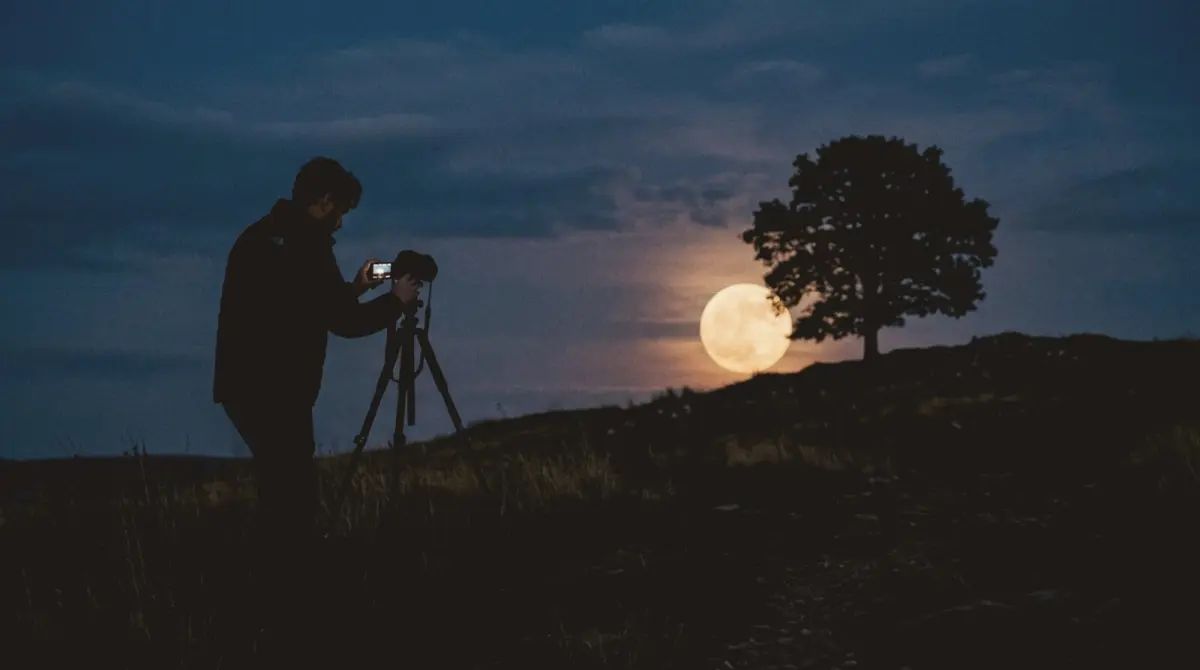
The moon turns into a white blob on iPhone because the camera exposes for the dark sky, which makes the bright moon far too bright. To fix it: zoom in to your longest lens, tap on the moon, and drag the exposure slider all the way down until you can see the craters. Keep the phone steady, and you will get a sharp, detailed moon.
Settings step by step
- Turn off flash and Night Mode if it turns on. The moon is bright; you do not need a long exposure.
- Zoom to your longest optical lens (3x, 4x or 5x depending on your iPhone). Beyond that, digital zoom loses detail.
- Tap on the moon to focus.
- Drag the exposure slider down (the sun icon) until the moon shows grey and white detail instead of a glow.
- Hold the focus and exposure by pressing and holding on the moon until AE/AF Lock appears.
- Steady the phone. Lean on a wall or use a tripod, and use the 3-second timer.
When to shoot
- Moonrise and moonset. The moon near the horizon looks bigger next to trees and buildings, and has a warm colour.
- Blue hour. A full moon rising while the sky is still blue gives you a colourful sky and a detailed moon in one shot.
- Half moon for detail. Craters along the shadow line show the most texture. A full moon is flatter.
Framing the moon
A moon alone in black is a test shot. A moon with a foreground is a photo.
- Add a silhouette: a tree, a rooftop, a lighthouse, a person.
- Put the moon on a third. The One-Point Vertex guide places a single subject on a grid point with empty sky around it.
- Use the horizon. Keep it on the lower third and level.
- Shoot from far away with full zoom, so the moon looks large next to the foreground.
Photographing a person with the moon
Put the person far away (50 metres or more) on a hill or rooftop, stand far back yourself, zoom in fully and time the shot as the moon rises behind them. Distance makes the moon look huge relative to the person.
Common mistakes
- Leaving exposure on auto: the moon blows out.
- Using digital zoom past the lens: mushy detail.
- Shooting through a window: reflections and blur.
- A moving hand: at long zoom, tiny shakes blur the moon.
For stars and the night sky, see how to photograph stars on iPhone.
Frame the night sky
slay overlays composition guides and a horizon level on your live iPhone camera, so the moon and the foreground land in the right place.
Get slay on the App Store: https://apps.apple.com/app/id6807513456?utm_source=slaycamera&utm_medium=article&utm_campaign=moon-photos-iphone
Questions about this article
Quick answers from the article. Ask anything else below — the assistant answers from the app's docs.
Frame it perfectly, every time.
Free to download. Slay Pro from $1.99/week unlocks every guide, LUT and lesson.
Download the App