How to photograph the northern lights on iPhone
Night Mode, a steady phone and a foreground. The settings and framing that turn a faint aurora into a photo worth keeping.

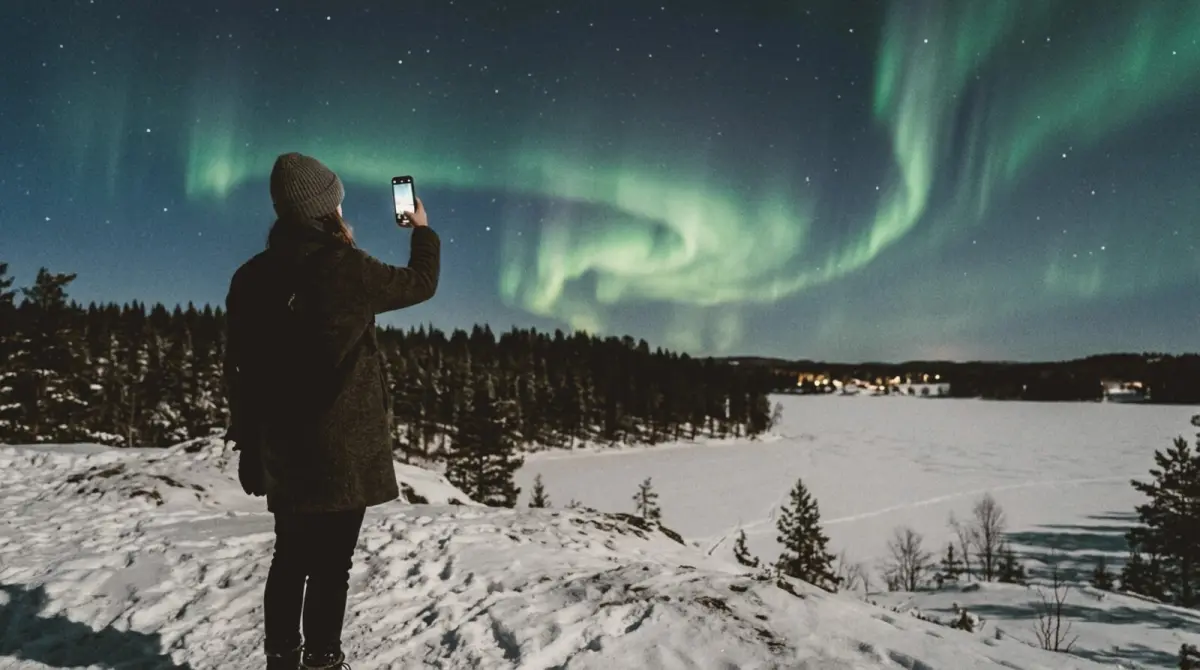
To photograph the northern lights on an iPhone, turn off the flash, put the phone on something completely still, let Night Mode take its longest exposure, and include something on the ground (a tree line, a house, a person) in the bottom third of the frame. The camera often sees more colour than your eyes do, so take a photo even when the aurora looks faint and grey.
Before you go
- Check the forecast. Aurora apps and space-weather sites give the Kp index and cloud cover. Clear skies matter as much as activity.
- Get away from city lights. Even a small town washes out a faint aurora.
- Bring a tripod, or plan to rest the phone on a rock, a car roof or a backpack.
- Charge your phone and bring a battery. Cold drains it fast.
- Let your eyes adjust. Turn off your screen brightness and wait 15 minutes in the dark.
iPhone settings
- Turn off flash. It does nothing for the sky and lights up snow in front of you.
- Use the 1x main lens. It gathers the most light. The ultra-wide 0.5x fits more sky but is noisier.
- Let Night Mode trigger. In the dark, a yellow moon icon shows the exposure time. When the phone senses a tripod, it allows much longer exposures; tap the icon and drag the slider to the maximum.
- Focus on a distant light. Tap on a bright star or a far-off light and hold to lock focus.
- Use the timer. A 3-second timer stops your tap from shaking the phone.
- Turn off Live Photo. It can lower quality in long exposures.
Framing the aurora
A sky full of green with nothing else is pretty but forgettable. The best aurora photos have a foreground.
- Put the horizon on the lower third. Give the sky two-thirds of the frame. The One-Third guide places it for you.
- Add a silhouette. A pine, a cabin, a mountain or a person standing on a rock.
- Use reflections. A lake or a wet beach doubles the aurora.
- Shoot vertical too. Aurora arcs often rise straight up, and vertical photos suit phones and stories.
Photographing people under the aurora
- Ask the person to stand very still for the whole exposure, 3 to 10 seconds or longer.
- Light them briefly. A phone torch from the side for one second, held far away, can lift their face without blowing out the sky.
- Or make it a silhouette. A person against the green sky is a strong image with no lighting at all.
- Put them small. A small figure under a huge sky shows the scale. The Travel Shot guide frames a small subject with a big scene above.
After the shot
- Do not over-saturate. Real aurora greens look more impressive than neon.
- Lower the highlights if the brightest part of the arc looks flat.
- Keep some noise. A little grain looks natural at night, like film.
Frame the sky
slay overlays composition guides and a horizon level on your live iPhone camera, so the tree line stays straight and the sky gets the space it needs.
Get slay on the App Store: https://apps.apple.com/app/id6807513456?utm_source=slaycamera&utm_medium=article&utm_campaign=northern-lights-iphone-photos
Questions about this article
Quick answers from the article. Ask anything else below — the assistant answers from the app's docs.
Frame it perfectly, every time.
Free to download. Slay Pro from $1.99/week unlocks every guide, LUT and lesson.
Download the App